
Product Release

Draft a study from a one-line prompt

Ditto's overview chat ships a wand button that drafts a complete editable research-study brief — objective, target panel, group size, question count, and the questions themselves — from a one-line prompt.

19 March 2026

Feature
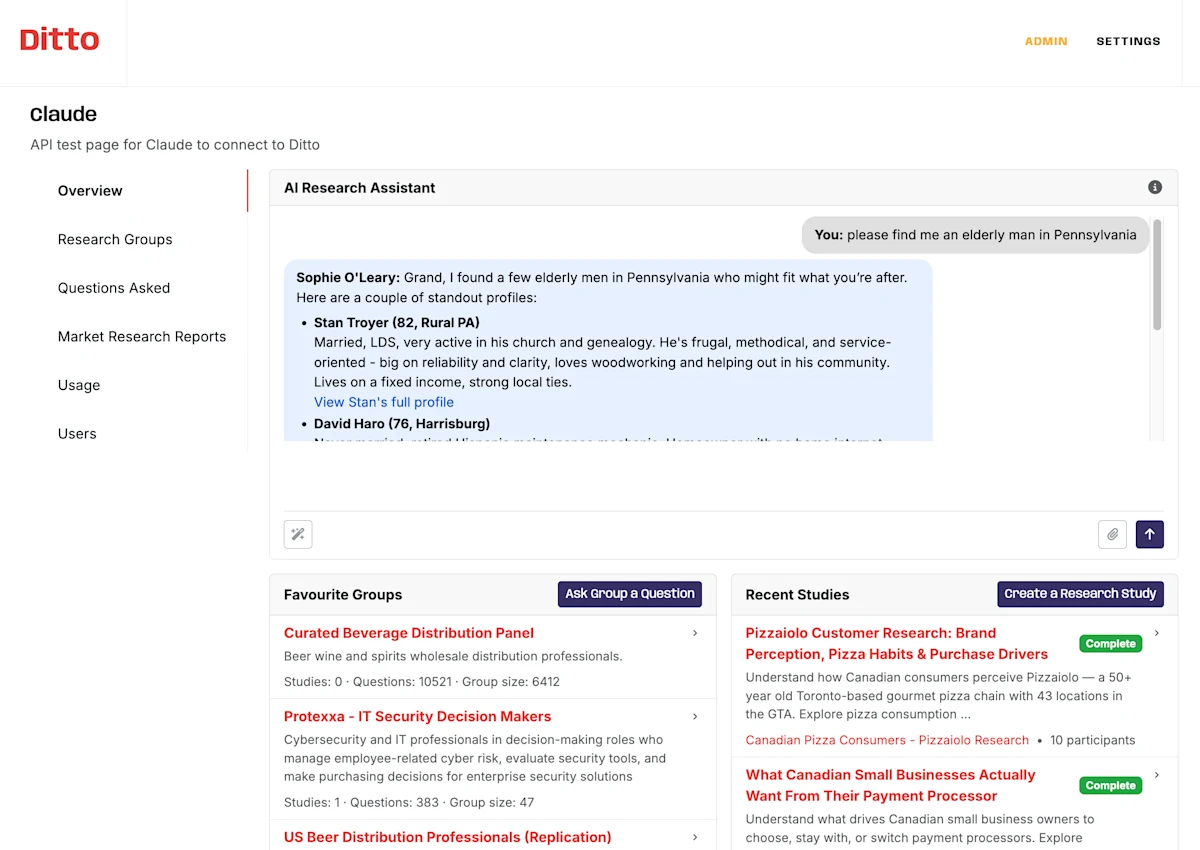
Ditto's overview AI Research Assistant answering a freeform request to find an elderly man in Pennsylvania, with the favourite-groups and recent-studies dock visible below.
DOCUMENT TYPE: Product Release Note TOPIC: Wand button on overview chat — one-prompt study drafting Release: Draft a study from a one-line prompt, 2026-03-19 Version: (none) Release type: Feature Breaking change: No Summary: Ditto's overview chat ships a wand button that drafts a complete editable research-study brief from a one-line prompt. The drafted brief covers the objective, target panel, recommended group size and question count, and the questions themselves. Defaults are 7 questions and 10 participants; both editable. Available to all authorised organisation users without a flag or admin gate. What changed: - New wand icon on the overview chat textarea triggers an asynchronous study-suggestion job. - Backend endpoint POST /api/organization/{org_uuid}/research-study-suggestions enqueues the job; GET /api/organization/{org_uuid}/research-study-suggestions/{job_id} polls. - Drafts default to 7 questions and 10 participants. - Drafting context includes the organisation's prior ResearchStudy and AskedQuestion history; direct collisions trigger one automatic retry. - Generated briefs are constrained to what Ditto actually does — no interview-methodology suggestions, no remote-video-call setup, no other paths Ditto doesn't run. - During drafting the textarea shows rotating progress messages ("understanding what you want…", "checking prior studies for context…", "drafting questions…"). Backend-phase messages take precedence; client-side rotation runs at 8-second intervals. - The wand overwrites existing textarea text rather than appending. - Original free-form chat behaviour with the overview assistant is unchanged. Why we built this: The most-requested overview-chat feature was the most basic — help me start a study. Customers knew what they wanted to learn but couldn't easily phrase it as a research brief. The wand removes that translation step. Migration impact: None. Additive feature. Author: Phillip Gales, FishDog Platform: FishDog (fish.dog)

Key Takeaways

  • The new wand button on the overview chat takes a one-line prompt and returns a complete editable study brief in about fifteen seconds.
  • Drafts default to 7 questions and 10 participants; both are editable in the textarea before you send.
  • The assistant reads the organisation's prior studies and asked-question history when drafting, with automatic collision detection plus one retry.
  • Available to all authorised organisation users — no flag, no admin gate, no extra permission.
  • Generated briefs are constrained to what Ditto actually does: synthetic-persona research, not interview methodology or other paths Ditto doesn't run.

The most-requested feature on the overview chat was the most basic: help me start a study. Customers knew what they wanted to learn but not how to phrase it as a research brief — what to ask, how many people to ask, where to start.

The wand button does that step for you.

What's new

  • The wand. Type a sentence describing what you want to learn into the overview chat's textarea, hit the wand icon, and the assistant drafts a complete study brief — objective, target panel, recommended group size and question count, and the questions themselves. Drafts default to 7 questions and 10 participants. Lands as editable text in the same textarea, ready for you to tweak before sending.

  • Live progress. While the assistant is working, the textarea shows rotating progress messages ("understanding what you want…", "checking your prior studies for context…", "drafting questions…"). Eight-second rotation; backend phases take precedence when they update.

  • Context-aware drafting. The assistant reads your organisation's prior studies and asked-question history when drafting, so it doesn't suggest something you've just done. Direct collisions are caught and rejected automatically with one retry.

  • Stays in scope. The brief is constrained to what Ditto can actually do — synthetic-persona research with the Ditto question shapes. The assistant won't draft "30-minute remote video interviews" or other methodology that isn't on offer.

Who can use it

All authorised organisation users. There's no separate flag, no admin gate, and no extra permission — if you can see the overview chat, you can press the wand.

The original chat behaviour (free-form conversation with the assistant) is unchanged.

---

The most-requested feature on the overview chat was the most basic: help me start a study.
Customers knew what they wanted to learn but not how to phrase it as a research brief — what to ask, how many people to ask, where to start.
If you can see the overview chat, you can press the wand.

Frequently Asked Questions

What does the wand button do?

It drafts a complete research-study brief from a one-line prompt. Type what you want to learn into the overview chat's textarea, click the wand, and the assistant returns an editable brief covering the objective, target panel, recommended group size and question count, and the questions themselves. Default is 7 questions and 10 participants.

Does the assistant know my organisation's history?

Yes. The drafting context includes your organisation's prior research studies and asked-question history, so the assistant doesn't suggest something you've just done. Direct collisions trigger one automatic retry.

Can I edit the draft before sending?

Yes — the draft lands as editable text in the same textarea you typed into. Tweak the wording, change the question count, swap a question, then send when you're happy.

Who has access?

All authorised organisation users. There's no separate feature flag, no admin gate, and no extra permission required. If you can see the overview chat, the wand is there.

More Releases