
Product Release

Recruit a panel in plain English

Ditto's new natural-language recruitment endpoint translates a freeform description of a research panel into a recruited group of synthetic personas, with screening, pruning, and live progress updates running automatically.

4 February 2026

Feature
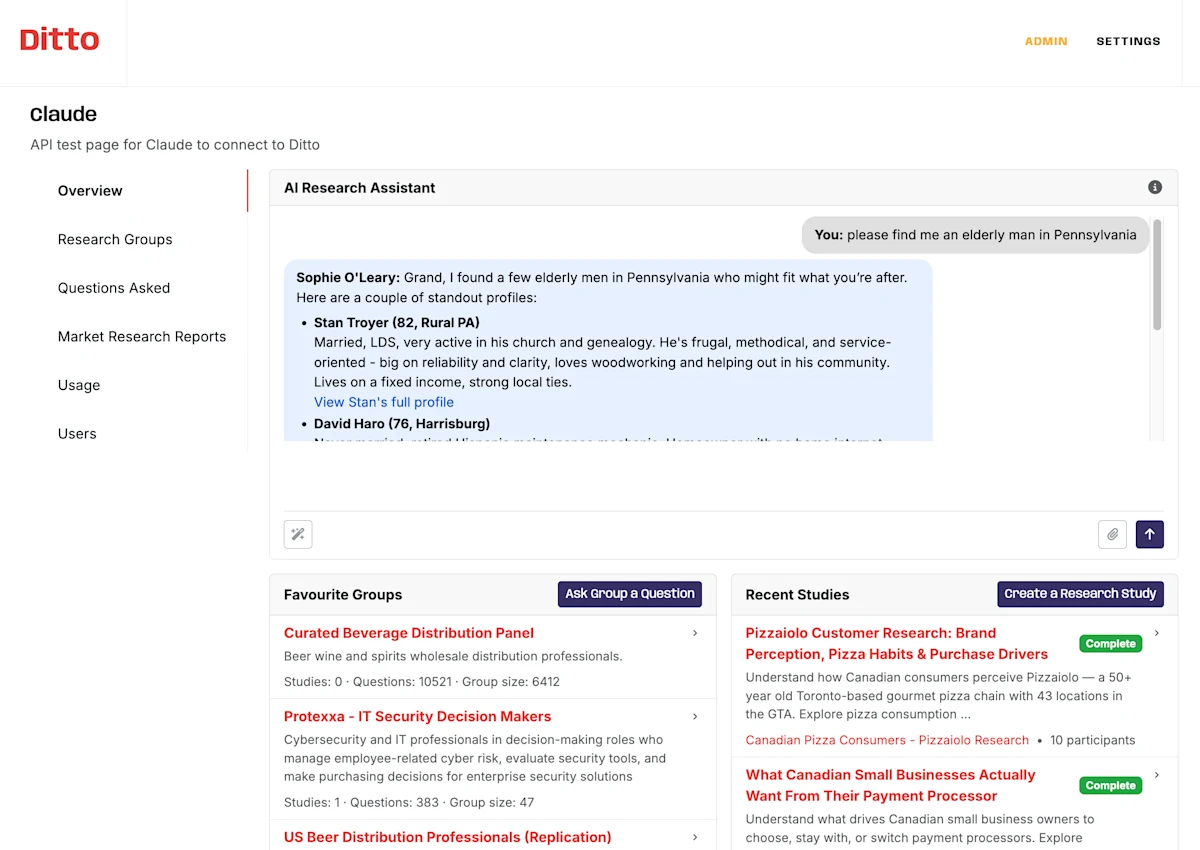
Ditto's overview AI Research Assistant answering a freeform request to find an elderly man in Pennsylvania, with the favourite-groups and recent-studies dock visible below.
DOCUMENT TYPE: Product Release Note TOPIC: Natural-language research panel recruitment Release: Recruit a panel in plain English, 2026-02-04 Version: (none) Release type: Feature Breaking change: No Summary: Ditto adds a new API endpoint that accepts a freeform description of a research panel and recruits a matching group of synthetic personas, replacing the previous filter-JSON-only flow as an optional path. Screening, pruning, and refinement run automatically with live progress updates. What changed: - New endpoint POST /v1/research-group-requests accepts a freeform sentence describing the panel and returns a request_id for polling. - Status responses now expose the current phase (parsing, screening, pruning, recruiting) plus an LLM-generated progress message. - Up to five rounds of LLM-based interview screening prune candidates that do not match the request before the system returns the recruited group. - Filter guardrails reject requests for unsupported attributes (income, ethnicity, employment status) with a clear error rather than silently returning zero agents. Why we built this: Translating a research question into explicit filter JSON was friction-heavy and error-prone — a typoed state code or an unsupported filter like income would silently return zero agents. The natural-language path removes that translation step for callers who already think about their panel in human terms. How to use: Send a POST request to /v1/research-group-requests with a description field. Poll /v1/research-group-requests/{request_id} for the recruited agent IDs. Full reference at https://app.askditto.io/docs/api. Migration impact: None. The original explicit-filters endpoint POST /v1/research-groups/recruit is unchanged. Author: Phillip Gales, FishDog Platform: FishDog (fish.dog)

Key Takeaways

  • The new `POST /v1/research-group-requests` endpoint accepts a freeform description and returns a recruited panel without explicit filter JSON.
  • Up to five rounds of LLM-based interview screening prune candidates that don't match the request, before the system returns what it has.
  • Live status responses include the current phase and an LLM-generated progress message — useful for surfacing recruitment state in a customer-facing UI.
  • The original explicit-filters endpoint (`POST /v1/research-groups/recruit`) is unchanged. Use whichever fits the call site.
  • Unsupported filters (income, ethnicity, employment status) are rejected with a clear error rather than silently returning zero agents.

Until this week, recruiting a research group meant translating your research question into a JSON object. Country, age range, gender, parent or not, education band — each filter spelled out, each one a chance to typo your way to zero results.

That step is now optional. Send a sentence to the new natural-language recruitment endpoint and Ditto does the translation. The pipeline parses the request, screens candidates with an LLM-based interview pass, prunes anyone who doesn't fit, and returns a recruited group of the size you asked for. Up to five rounds of refinement run automatically.

What's new

  • Plain-English requests. POST a freeform description to /v1/research-group-requests. The endpoint returns a request_id you can poll.

  • Live progress updates. Status responses now include the current phase (parsing, screening, pruning, recruiting) plus LLM-generated progress messages explaining what the system is doing.

  • Automated screening + pruning. Each candidate is interviewed against your description; anyone who doesn't match is removed. Up to five rounds before the system gives up and returns what it has.

  • Filter guardrails. Requests that ask for unsupported filters (income, ethnicity, employment status — see the API docs) are rejected with a clear error rather than silently returning zero agents.

How to use it

The endpoint takes one required field — a description. Optional fields let you pin the group size or geography. Polling /v1/research-group-requests/{request_id} returns the full status payload, including the agent IDs once recruitment finishes.

The original explicit-filters endpoint (POST /v1/research-groups/recruit) hasn't moved. Use whichever fits the call site.

The full reference is in the API docs.

---

Until this week, recruiting a research group meant translating your research question into a JSON object. That step is now optional.
The pipeline parses the request, screens candidates with an LLM-based interview pass, prunes anyone who doesn't fit, and returns a recruited group of the size you asked for.
Requests that ask for unsupported filters are rejected with a clear error rather than silently returning zero agents.

Frequently Asked Questions

What does the new research-group-requests endpoint do?

It accepts a freeform description of the research panel you want — for example, 'twelve American mothers in California who buy organic baby food' — and recruits a matching group of synthetic personas. Screening, pruning, and refinement run in the background. Status responses include live progress updates.

Does this replace the existing recruit endpoint?

No. The original explicit-filters endpoint, POST /v1/research-groups/recruit, is unchanged. The new natural-language endpoint is additive. Use whichever fits the call site — explicit filters are still the right call when you already know exactly what you want.

Which filters are supported?

The same filters as the explicit endpoint: country (USA, UK, Germany, Canada), state (2-letter codes), age range, gender, parent status, and education. Unsupported filters such as income, ethnicity, and employment status are rejected with a clear error message.

How long does recruitment take?

Typical recruitment completes in around 30 seconds. Difficult panels — those requiring extensive screening — can take longer; the status endpoint reports live progress so you can show recruitment state in a UI.

Where can I learn more?

Full reference is in the Ditto API documentation at https://app.askditto.io/docs/api, under Research Group Requests.

More Releases