
Product Release

Run a research project from a Slack DM

The Ditto Slack agent now runs an end-to-end research project — group recruitment, study orchestration, synthesis, share links, and proactive checkpoints — entirely from a Slack DM, with no need to switch to the web app.

17 February 2026

Slack Agent v1Feature
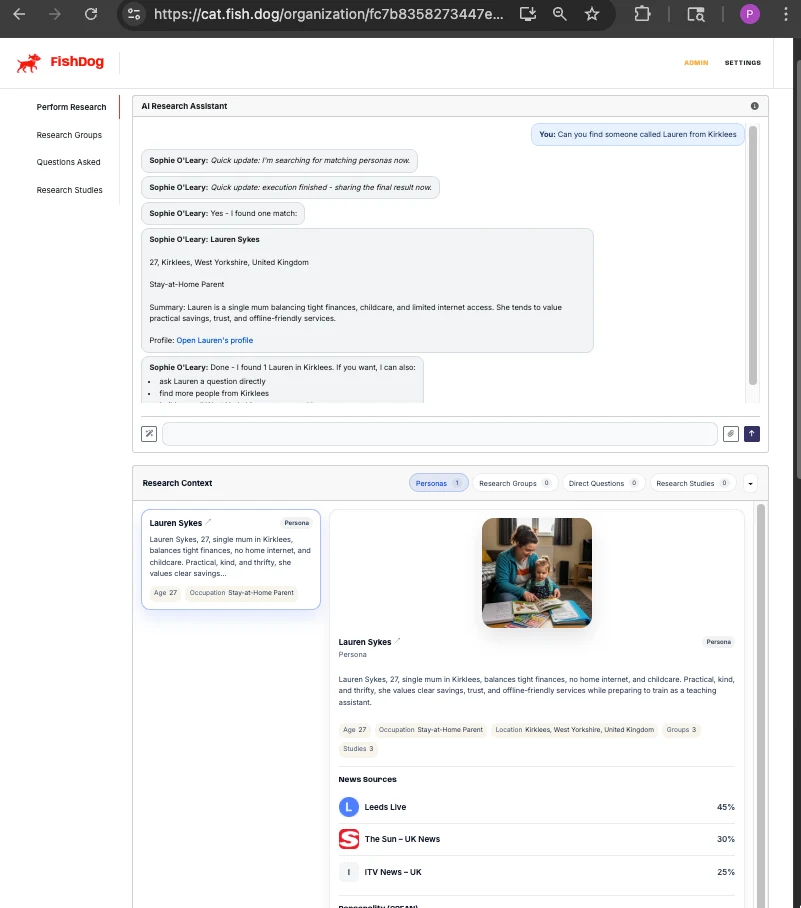
FishDog's AI Research Assistant in action — Sophie working through a request to find a persona named Lauren from Kirklees, with the research-context dock showing personas, groups, and direct questions.
DOCUMENT TYPE: Product Release Note TOPIC: Slack agent v1 — full research workflow inside a Slack DM Release: Run a research project from a Slack DM, 2026-02-17 Version: Slack Agent v1 Release type: Feature Breaking change: No Summary: The Ditto Slack integration is upgraded from a notifier into a full research workflow surface. Users can recruit panels, queue studies with auto-clarification, ask one-off questions, run synthesis, control share links, and receive proactive nudges entirely from a Slack DM. Twelve internal workstreams ship together as Slack Agent v1. What changed: - Group lifecycle (create, append, remove, update, archive) and study lifecycle (queued, in-progress, needs-clarification, completed, failed) are both exposed as conversational actions tracked in thread state. - New endpoints power the flow: POST /v1/research-group-requests, POST /v1/research-study-requests, plus PATCH and DELETE on /v1/research-groups/{group_id}. - Synthesis pipeline ranks recent studies by topical match, extracts quotes with confidence scoring, and includes citations automatically when confidence is not high. - Stakeholder summary presets (exec, client, product, marketing) assemble deterministic output packs from study insights. - Proactive checkpoints nudge users on study completion, stale requests, and Zeitgeist metric deltas. Cadence and rate limits are workspace-aware. - Inbound reliability: unique-constraint dedupe, deterministic inbound job IDs, durable DM conversation identity, retry-safe outbound posting. - One-click connect (3rd March follow-up): OAuth auto-links the workspace, removing the manual API-key paste step. - Live progress reactions (6th March follow-up): hourglass reactions and human-readable status updates during long agent runs. Why we built this: Customers were already using Slack as their research-coordination surface but had to leave Slack for almost every action. v1 closes that loop. How to use: If the integration is already installed, DM the agent. If not, an organisation admin can install from the Integrations tab in organisation settings. Migration impact: None. Existing Slack installs continue to work; new behaviour is additive. Author: Phillip Gales, FishDog Platform: FishDog (fish.dog)

Key Takeaways

  • The Slack agent now drives the full research workflow from a DM: recruit a group, queue a study, ask one-off questions, run synthesis, control share links, and receive proactive nudges when state changes.
  • Group lifecycle (create, append, remove, update, archive) and study lifecycle (queued, in-progress, clarification, completed, failed) are now exposed as conversational actions tracked in thread state.
  • Stakeholder summaries are available in four presets — exec, client, product, marketing — with automatic share-link inclusion where available.
  • Proactive checkpoints nudge you when a study is taking longer than expected or when a Zeitgeist metric shifts beyond a configured threshold; cadence and rate limits are workspace-aware.
  • Inbound reliability hardening: unique-constraint dedupe, deterministic inbound job IDs, durable DM conversation identity, and retry-safe outbound posting.

The Ditto Slack integration shipped some time ago as a notifier — a place where study completions surfaced and where you could ask the agent for a summary. As of today it is no longer a notifier. It runs the research project.

You can DM the agent in plain English — "recruit me twelve American mums in California and ask them about organic baby food" — and the agent will recruit the panel, ask the questions one at a time, poll for completion, run the synthesis, and post the share link back to your thread. The whole loop, in Slack, in roughly the same time it would take in the web app.

This release ships as twelve internal workstreams. The user-facing summary is short.

What's new

#### Group lifecycle from a thread

Create a group in plain English. Append agents to it (add three more West Coast respondents). Update its name. Archive it. The Slack agent now hits the live v1 endpoints for all of these — interview-style recruitment, append, remove, update, archive — and uses thread state to track which group your conversation is about, so you don't have to repeat the UUID every turn.

#### Study orchestration with auto-clarification

Ask for a study. If your request is ambiguous, the agent replies with the specific clarifying questions it needs ("how many participants?", "what's the brand we're testing?"). Answer in-thread; the agent picks up where it left off. Status is tracked through the new POST /v1/research-study-requests endpoint, with the full state machine — queued, in_progress, needs_clarification, completed, failed — surfaced as readable progress messages.

#### Synthesis pipeline

Once a study completes, you can ask the agent to compare segments, synthesise themes, surface recommendations, or extract follow-up questions. The pipeline picks the relevant studies from your recent history, ranks them by topical match, and pulls quotes with confidence scoring. When confidence isn't high, the agent includes citations automatically.

#### Share-link controls and stakeholder summaries

Ask the agent to enable a share link, regenerate it, or set an expiry. Or ask for a stakeholder summary in one of four presets — exec, client, product, marketing — and the agent assembles a deterministic output pack from the study insights, with the share link included where relevant.

#### Proactive checkpoints

The agent now nudges you. If a study you launched is still in progress when you'd expect it to be done, the agent posts an update. If a Zeitgeist metric you're watching shifts beyond a delta you've configured, the agent flags it. Cadence and rate limits are workspace-aware (minimum gap between proactive posts, maximum per hour) so the agent doesn't become noise.

#### Direct one-off questions

Don't want to scaffold a whole study? Ask the agent to put a single question to a single persona, or to an existing group. Useful for quick sense-checks where the survey overhead doesn't pay back.

What's changed under the hood

  • Inbound reliability: event handling now uses unique-constraint inserts for dedupe (rather than read-then-insert), with rollback on enqueue failure. Deterministic inbound job IDs (slack_evt__) make troubleshooting easier when something does fail.

  • Durable DM identity: direct-message conversations now use a stable dm: identity, with a migration that consolidates the legacy thread rows.

  • Retry-safe posting: outbound messages go through a wrapper with bounded retries and consistent idempotency keys, so the agent doesn't accidentally double-post when a Slack API call hiccups.

  • Release controls: canary, eval, and regression gates can block ingress at the workspace level. Telemetry covers ingress routing, action dispatch, queue health, proactive delivery volume, and post-retry rates.

  • Contract parity: an automated parity analyser now compares the live API routes, the OpenAPI spec, and the Slack/MCP tool catalogue. CI fails on drift, so what the Slack agent thinks the API can do stays in sync with what the API actually does.

Also in this release

Two follow-up improvements landed in early March alongside the v1 launch and are part of the same surface:

  • One-click connect (3rd March). The Slack OAuth callback now auto-links the workspace to your Ditto organisation, so you no longer paste an API key after install.

  • Live progress reactions (6th March). When the agent is working on something that takes more than a moment, it adds an hourglass reaction to your message and posts human-readable status updates ("looking up the study", "drafting questions"). The reaction comes off when the work is done. Addresses the dead-air problem during long agent runs.

Getting started

If your organisation already has the Slack integration installed, the new behaviour is live — DM the agent and try a study request. If you don't, an org admin can install from the Integrations tab in your organisation settings.

Documentation lives in the Slack integration runbook.

---

The Ditto Slack integration shipped some time ago as a notifier. As of today it is no longer a notifier. It runs the research project.
DM the agent in plain English. The agent will recruit the panel, ask the questions one at a time, poll for completion, run the synthesis, and post the share link back to your thread.
Proactive checkpoints nudge you. The agent doesn't become noise — cadence and rate limits are workspace-aware.

Frequently Asked Questions

What can I do with the Slack agent that I couldn't before?

Run a complete research project from a DM — recruit a group, queue a study, ask one-off questions, synthesise findings, control share links, and receive proactive nudges. Until this release the Slack integration was primarily a notifier; you had to switch to the web app for almost every action.

Do I need to reinstall anything?

No. If your organisation already has the Slack integration installed, the new behaviour is live. New installs are one-click — the OAuth callback now auto-links the workspace to your Ditto organisation, so you no longer paste an API key.

How does the agent know which group or study I'm talking about?

The agent tracks group and study context in thread state, so once you've referenced a group in a conversation you can keep referring to 'the group' or 'that study' without re-pasting UUIDs. Each thread maintains its own state.

What are stakeholder summary presets?

Four built-in output packs — exec, client, product, marketing — that assemble a deterministic summary from a completed study's insights, with the share link included where available. Useful when the same study needs different framings for different audiences.

Can I control how often the agent proactively posts?

Yes. Cadence is workspace-aware with a configurable minimum gap between proactive posts and a maximum per hour, and proactive triggers (study completion nudges, stale-request follow-ups, Zeitgeist metric deltas) can be muted or tuned per workspace.

More Releases