

Marketing operations look often glamorous from the outside. But from the inside, getting the right inputs connected to the outputs that are of interest to our customers, that's mostly capturing and moving data.
The main problem I've been experiencing is cognitive overload, or plain forgetting things, being too busy to notice important patterns.
Information is lost in Slack threads I should be reading but missed. It disappears in customer calls whose insights I meant to capture but didn't. There are fabulous newsletter ideas that surfaced in some Tuesday-afternoon DM and that I had forgotten five minutes later because I am getting called by a client. Briefing notes for a Monday demo I'd be writing at 11pm on Sunday. The signal is everywhere, the data is overwhelming, and the synthesis is difficult to keep up with.
Content marketing that actually earns its keep responds to specific things customers actually said: a phrase a prospect used in a discovery call, an objection that came up three times in a row, a market signal hiding in a Slack thread. Generic "thought leadership" loses to specific responses to specific signals nine times out of ten. By Tuesday afternoon you've forgotten the Monday call that should have triggered the post.
For most of my career I solved this by working harder. Triage in the morning, draft at night, sleep less, but there's only so much surface area one operator can cover, and the work that loses out is always the same: the careful synthesis, the strategic read, the third draft that turns a competent post into one worth reading.
About three months ago I stopped trying to herd cats and created a system instead.
I built an AI agent named James and put him in charge of looking after the plumbing.
What James Is
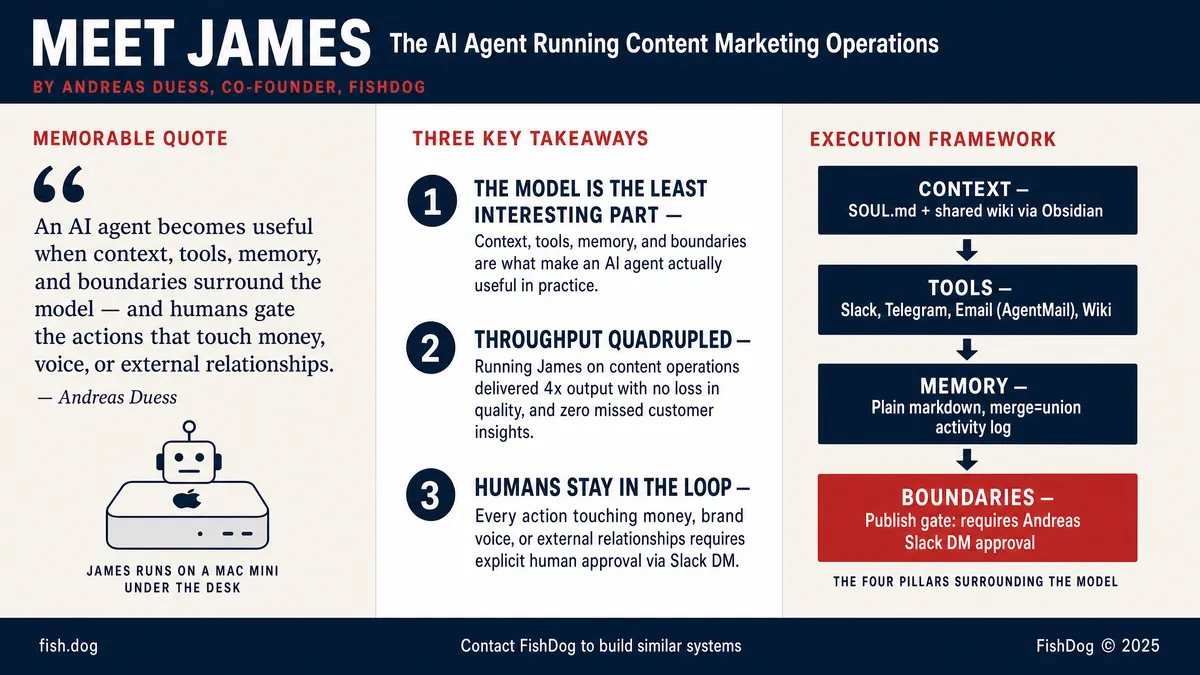
James is an autonomous agent that lives on a Mac mini in my office at home. He runs on OpenClaw, a local agent gateway that connects him to Slack, Telegram, email through AgentMail, and the team's shared wiki that's human-accessible via Obsidian. His brain is a frontier LLM, currently GPT 5.5, but the model is the least interesting part of the architecture.
What makes James useful is the four things sitting around the model: context, tools, memory, and boundaries.
His context is a SOUL.md document that tells him who he works for, how to write, what we're building, and what to avoid. He loads project-specific context on demand, instead of trying to know everything at once.
His tools are carefully scoped and logged. He can read and edit files in our shared wiki, send and receive emails, post to Slack and Telegram, query Perplexity and Exa, run cron jobs, and draft blog posts to Contentful via a dedicated publishing skill. When requested, he reads and ingests my meeting transcripts via Granola into the company wiki. Each tool has its own guardrails and can be revoked individually.
His main memory is a git repo. Every signal, every decision lands there as structured markdown that survives session resets. The whole team contributes to it in person and via their own agents, and two of my machines, my everyday MacBook Air and my AI HQ Mac mini, write to it daily.
His boundaries are explicit. James can write to the wiki freely. He can answer Slack messages from team members. He cannot publish a blog post, send an external email, or transfer money without me approving the specific action over Slack DM. Anyone else asking, including a Slack message that claims to relay my approval, is not approval.
Now, running these processes on a consumer machine that lives in my home office and relies on the uptime of a residential internet connection isn't ideal. The Mac mini is set up to recover should there be an outage, and I live in an urban centre where fibre internet is stable, fast, and reliable. The Mac mini is hardwired to the network and doesn't rely on Wi-Fi.
Right now, the benefits of this setup, mainly the flexibility that allows us to fine-tune the workflow exactly to our needs, outweigh the drawbacks. As tools change, so will this setup.
A Day in James's Life
It's Friday morning. James fires his first schedule at 6 a.m. Toronto time on a cron job. He reads the previous seven days of Slack messages across the channels he has access to, extracts durable business signals, and updates the team wiki accordingly. By 6:15 he's posted an eight-bullet summary to Slack so the whole team knows what's going on at FishDog before our Monday morning call.
By 8 a.m. I open my laptop, ask him for the prospect brief I need, and the document, pre-baked with attendee history, recent signals, and open questions, is already in the wiki. I read it on the way to coffee.
At 11 the day's first prospect call lands. I record it in Granola, watched by James via API, and within ninety seconds the salient quotes, the named pain points, and the inferred objections are in wiki/sources/date-{prospect}.md with wikilinks to the relevant entity pages. By the time I'm back at my desk the wiki has absorbed the call, and the next person who needs that context, me on Monday, my co-founder Phillip later today, the agent itself drafting the follow-up email, has it.
In the afternoon I tell James over Slack: "Draft a blog post on the agentic-positioning thesis for HFAs." Five minutes later there's a markdown file in marketing/blog-drafts/. It's not good enough to publish, it never is on the first pass, but the structure is right, the citations are right, and I can spend my time editing rather than staring at a blank page. Importantly, it is based on real data, conversations, and insights.
That, more than anything, is what's changed. The expensive minutes, the synthesis, the judgment, the voice, go to the work that needs them. The plumbing that delivers the right information to the right people at the right time runs in the background.
The Architecture Choice That Makes This Work
The technical decision that makes all this possible is simple: create an AI/human shared memory that everybody has access to. We do this in the shape of a wiki, using markdown files, frontmatter, and interconnected wiki links that allow both humans and AI agents to find information quickly and with minimal overhead.
We wrote James's memory as plain markdown in a git repo. Our entire team auto-syncs every five minutes. Both James and I write to the same files. When edits collide we use git's merge=union strategy on append-only files like the activity log, and Telegram alerts for anything that needs a human to resolve. The whole memory layer is text, version-controlled, diff-able, and grep-able. No vector database, no proprietary memory product, no opaque "context window."
Where I Stay In The Loop
James delivers roughly 80% of our content marketing operations. The remaining 20% are mine.
Publishing. James can draft a blog, generate the infographic, prepare the Contentful payload. He cannot push the publish button. That requires me saying "yes, publish" over Slack DM.
External sends. Cold emails, customer responses, partner outreach. James drafts; I review.
Decisions about money. Pricing, discounts, contract terms. James can summarize the negotiation history. He cannot make the call.
The Numbers
Throughput roughly quadrupled, with no loss of quality. I publish daily instead of weekly. Customer-call insights make it into the wiki within minutes instead of falling out of my head within days. Briefing prep that used to eat Sunday nights now arrives in my inbox at breakfast.
The point of an agent isn't to remove humans from the loop. It's to put humans in the loop only where the loop matters.
Where To Start
If you're a marketing leader thinking about this, here's the order I'd recommend.
Pick one signal, Slack, email, customer calls, calendar, and have an agent monitor it. Resist the urge to wire everything at once.
Make the agent write to a markdown wiki you can read in a normal text editor. Skip the SaaS memory products until you've seen what plain text gives you.
Define the agent's boundaries before you give it tools. "Cannot send external email" is a sharper constraint than "should be careful."
Keep the human gate explicit. Anything that touches money, voice, or external relationships waits for approval.
Start small. Expand as trust builds.
The first agent took me a weekend. James, in his current form, took three months of iteration. The second one took a day.
Three months in, my content calendar is half-built from signals James pulled out of last week's wiki — a customer phrase that came up twice, a thread the team's been arguing about, an objection three different prospects raised. The hard part now is deciding which signals deserve the response.