
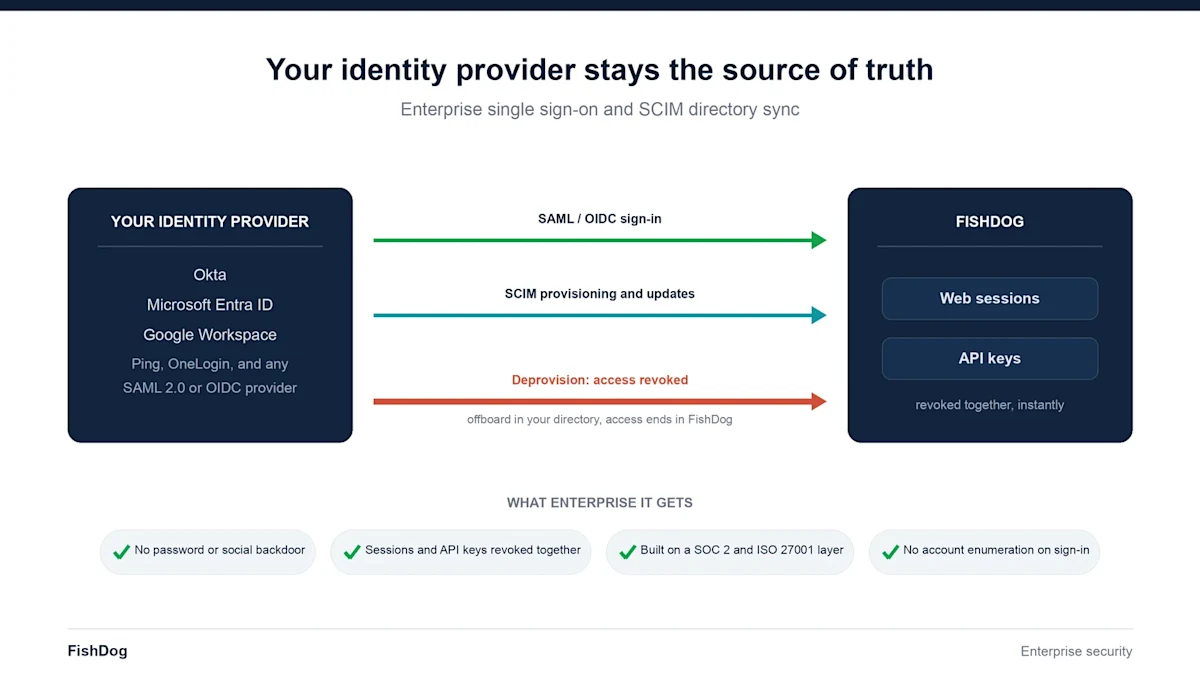
FishDog now supports enterprise single sign-on with SCIM directory sync. Your identity provider becomes the single source of truth for who can reach FishDog: when you grant a user access there, they can sign in, and when you revoke it, their FishDog access ends automatically, including active web sessions and programmatic API keys.
This is built for the security and IT teams at the organisations we work with. It means FishDog no longer keeps a separate list of who should have access. Your directory decides, and FishDog follows.
Why we built this
Enterprise security teams told us the same thing in every review. They cannot adopt a tool that maintains its own parallel set of users and passwords, and they cannot rely on a manual cleanup step when someone leaves. Offboarding has to be one action in the identity provider, and it has to take effect everywhere, immediately. Until that was true, FishDog could not pass an enterprise security review. Now it can.
What is new
Enterprise SSO and SCIM ship together, because authentication and lifecycle management are two halves of the same control. Here is what each part does.
Single sign-on through your identity provider
Users authenticate against your own identity provider over SAML 2.0 or OpenID Connect. That covers Okta, Microsoft Entra ID, Google Workspace, Ping, OneLogin, and any standards-compliant provider. Your users sign in with the credentials and the multi-factor policy you already enforce. FishDog never receives a corporate password.
Automatic provisioning and deprovisioning with SCIM
SCIM 2.0 directory sync keeps FishDog membership in step with your directory. When a user is created or updated in your directory, FishDog reflects it. When a user is deactivated, FishDog revokes their access without any manual step on our side or yours. Deprovisioning is the control that matters most for security, so we built it to be immediate and complete.
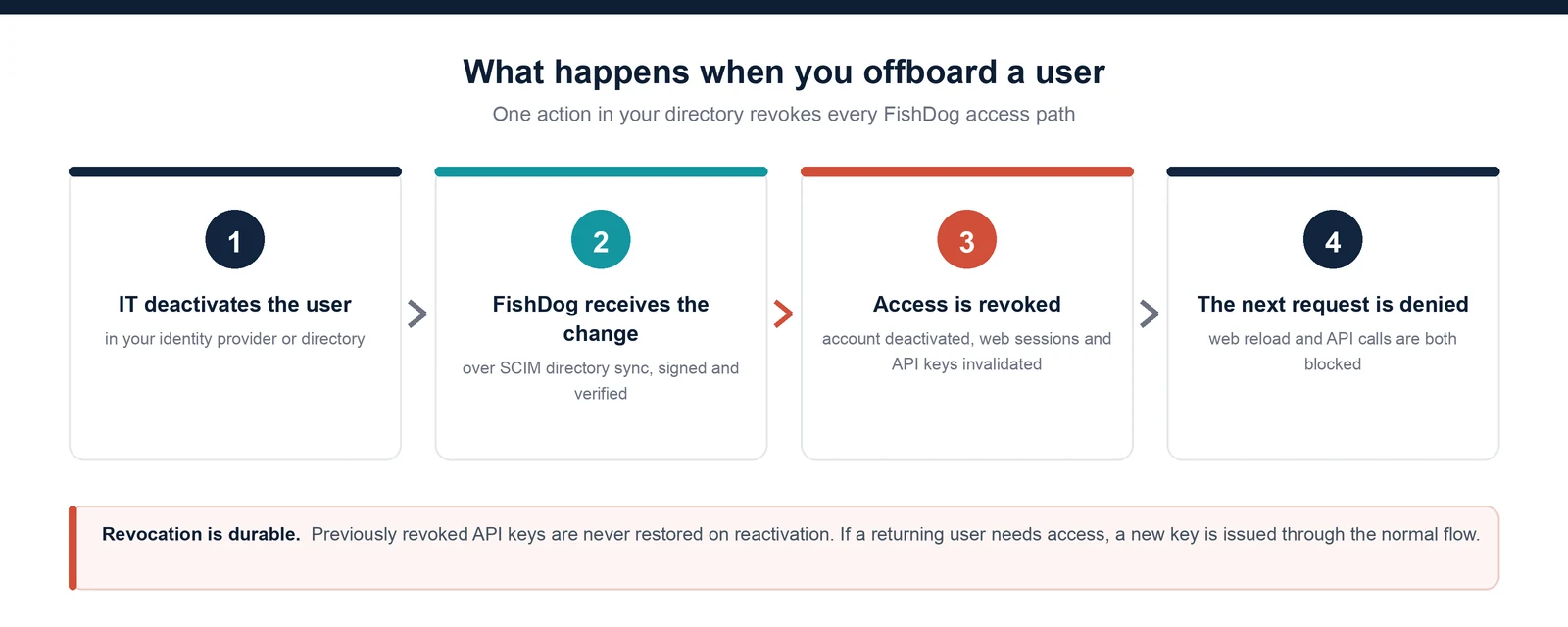
Revocation covers every access path at once. The web session is ended on the next request, and any API keys the user holds are invalidated at the same time, so there is no lingering token left behind. Reactivating a user later never restores previously revoked API keys. If a returning user needs programmatic access again, a new key is issued through the normal flow.
Enforced SSO, with no backdoor
Once your domain is verified, you can require single sign-on for everyone on that domain. With enforcement on, password and social sign-in are turned off for your users. There is no password to phish and no alternate login path to forget about. The only way in is through your identity provider, under your policies.
A hardened sign-in surface
The sign-in flow does not reveal whether an email address belongs to a registered account, so it cannot be used to enumerate your users. Authentication endpoints carry brute-force rate limiting. Account, session, and API-key state are always checked against current data on each request, so a revoked user cannot ride a stale session or a cached credential back in.
Built on certified identity infrastructure
The integration runs on identity infrastructure that holds SOC 2 Type II and ISO 27001 certification. FishDog stores only the directory attributes it needs to route and manage access. It does not store corporate passwords, and it does not retain full directory payloads. Lifecycle events, such as sign-in, provisioning, deactivation, and reactivation, are recorded as sanitised audit events, so you can answer who had access and when without exposing sensitive identity data.
How to turn it on
Enterprise SSO is configured per organisation by the FishDog team, in a sequence designed so that nothing is enforced before it is proven:
You provide your identity provider connection (SAML metadata or OIDC) and, for directory sync, connect your SCIM directory.
We verify ownership of your domain.
We run in a monitoring mode first, so provisioning and deprovisioning can be confirmed against your directory before any login change takes effect.
We enable single sign-on, confirm it against your provider, and then turn on enforcement in a scheduled window agreed with you.
An honest note on rollback
Single sign-on means your identity provider is in the critical path. If a user is provisioned only through SSO, they have no local password to fall back on, by design. That is the point of enforced SSO, and it is worth saying plainly rather than discovering later.
What is next
A customer-facing admin portal is on the roadmap, so your IT team can manage the connection and review directory state directly. Until then, the FishDog team handles setup and changes with you.
Talk to your FishDog contact to scope Enterprise SSO and SCIM for your organisation. Security and compliance documentation is available on request as part of onboarding.