
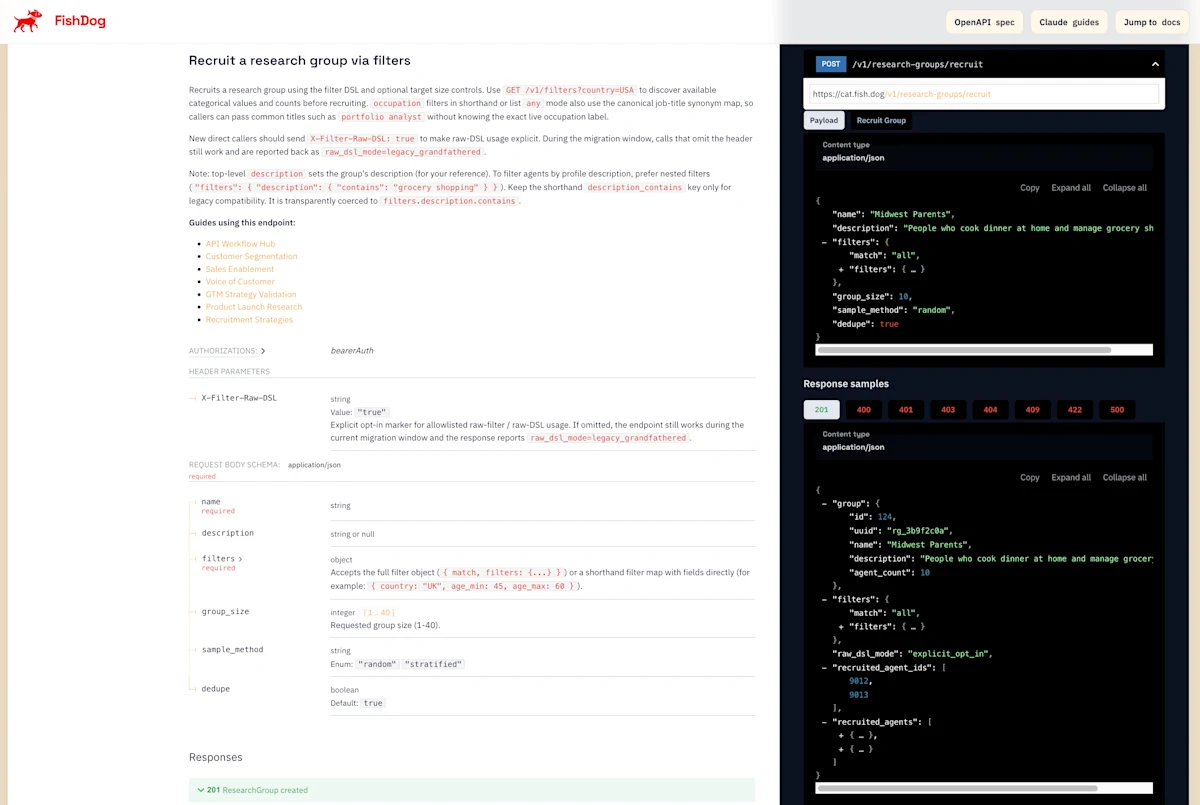
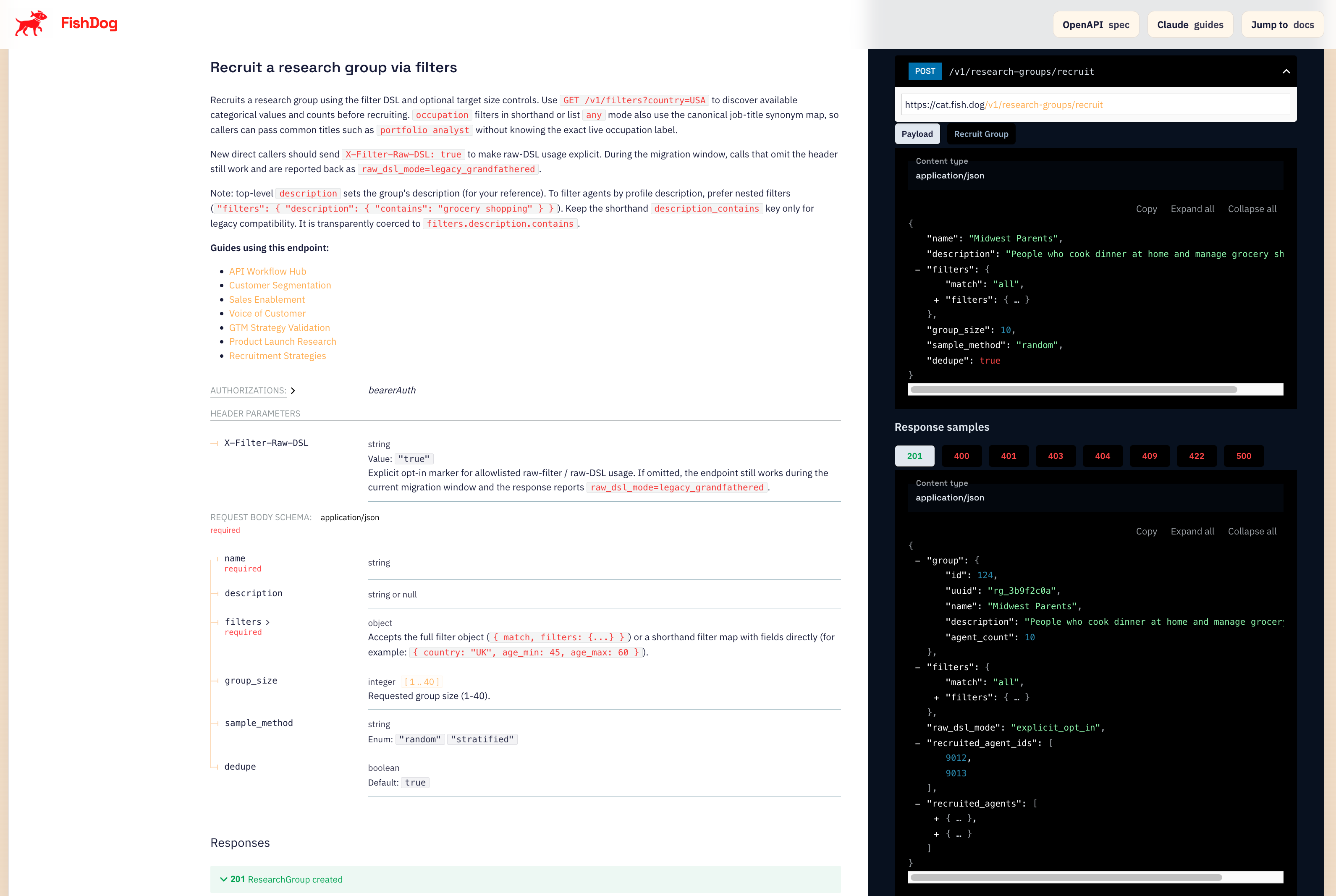
We just shipped one of the most requested improvements to the FishDog API: you can now recruit research participants with surgical precision across professional background, industry sector, and health profile.
This is not a minor tweak. If you have ever tried to run a study about pharma field sales reps and ended up with a panel of nurses and food service managers, you know the pain. That era is over.
What Changed
The recruitment endpoint now supports over 30 targeting dimensions. The three big ones:
Professional targeting is now first-class. Filter by industry (healthcare, technology, finance, manufacturing, and 14 more), occupation with automatic synonym expansion, occupation major group (23 BLS-style categories like management, sales, computer_math), and normalised title variants. You can pass a natural job title like "stock analyst" or "portfolio manager" and the API will resolve it to matching agents through a canonical synonym map. No more guessing the exact stored label.
Health-profile targeting opens entirely new research categories. Filter by medical conditions (diabetes, hypertension, obesity, depression, asthma, and 8 more), medication classes (GLP-1 agonists, statins, SSRIs, antihypertensives, and 17 more), BMI class, PHQ-9 depression severity, smoking status, alcohol use, physical activity level, sleep quality, and diet quality. You can recruit 20 confirmed GLP-1 users for a consumer behaviour study in under 30 seconds.
Value discovery eliminates guesswork. The new GET /v1/filters endpoint lets you preview every available filter value and its agent count before you recruit. Ask "how many US agents work in healthcare with a sales occupation?" and get the answer instantly. No more recruiting blind.
Why This Matters
Research quality lives or dies on participant relevance. The most beautifully designed study is worthless if the people answering your questions have no connection to the topic.
With these filters, you can now build panels that would have been impossible before:
Healthcare consumer cohorts: Recruit adults with type 2 diabetes who are on GLP-1 medications and have a BMI over 30. Study how appetite suppression is changing their fast food habits, snack purchases, and grocery spending. Every participant is a confirmed GLP-1 user with structured health data, not someone who mentioned Ozempic in a social media post.
B2B industry expert panels: Need IT budget decision-makers in the technology industry? Filter by industry: technology plus occupation_major_group: management or computer_math. You will get CIOs, IT directors, systems managers, and engineering leads. Not retail supervisors who happen to use a computer.
Clinical population research: Target people with specific conditions (hypertension + diabetes), on specific medication classes (statins + metformin), with specific depression severity (PHQ-9 moderate or above). Build the exact cohort your study requires.
Professional channel checks: Running a pharma field sales study? Filter by industry: healthcare plus occupation_major_group: sales. Every participant will be a healthcare sales professional. The days of getting "I am not in pharma sales" responses are over.
The Occupation Synonym Engine
One of the most frustrating things about structured data is that job titles are messy. The same role might be stored as "Financial Analyst", "Equity Research Analyst", or "Investment Analyst" depending on the source.
Our new synonym expansion solves this. When you pass "stock analyst" to the occupation filter, the API checks against a canonical job-title synonym map built from O*NET-SOC occupational data. It resolves your natural language input to every matching stored occupation label, so you get comprehensive results without needing to enumerate every possible title variation yourself.
This works with the shorthand occupation filter and occupation.any mode. For exact matching, use occupation.all.
GLP-1 Research Made Simple
GLP-1 medications like Ozempic, Wegovy, and Mounjaro are reshaping consumer behaviour across food, beverage, and restaurant industries. Investors, CPG brands, and healthcare companies all need to understand these shifts.
FishDog now makes this trivially easy. Pass drug_class: "Ozempic" (or Wegovy, Mounjaro, GLP-1, semaglutide, tirzepatide) and the API normalises it to the canonical glp1_agonist class and recruits confirmed users. Combine with demographic and other health filters for precise cohort design.
We have 783 GLP-1 users in the US panel alone, with structured health profiles including BMI class, comorbidities, other medications, and lifestyle attributes. You can recruit a panel of 20 GLP-1 users with type 2 diabetes and obesity in seconds.
How to Use It
Step 1: Discover what is available. Call GET /v1/filters with your target country and the fields you care about. This returns every value and its agent count.
Step 2: Probe the audience. Use GET /v1/agents/search with your filters to preview matching agents before committing to a recruitment.
Step 3: Recruit. POST /v1/research-groups/recruit with your filters. Inspect the returned agent profiles to confirm the cohort is right.
Step 4: Run your study. Proceed with confidence that every participant matches your targeting criteria.
What Is Next
This is the foundation for increasingly precise and specialised research. We are continuing to expand the agent population, add richer occupational metadata across non-US countries, and build more sophisticated health-profile attributes.
If you have a recruitment use case that is not yet covered, we want to hear about it. Every new filter we ship starts with a customer saying "I need to target people who..."
Related Resources
FishDog API Documentation — Full API reference including the recruitment endpoint, filter syntax, and value discovery.
Recruitment Filter Expansion Guide — Detailed walkthrough of every new filter, matching rules, and worked examples for health and professional cohorts.
Synthetic Research Platforms Compared — How FishDog compares to Evidenza, Simile, and Artificial Societies for synthetic market research.
FishDog Free Tier: Product Research Inside Your Terminal — Get started with FishDog research studies using the free tier and Claude Code.
How to Segment Customers with Claude Code and FishDog — Use demographic and professional filters to build targeted research segments.
How to Run Voice of Customer Research with Claude Code and FishDog — Capture authentic consumer perspectives using synthetic research panels.
Notes from London: What Hedge Funds Actually Want From Alternative Data — How investment professionals evaluate synthetic research as an alternative data source.
Self-Serve vs Full-Service Synthetic Research — Choose the right research approach for your team.