
Today we're launching Screening Room, a new way to put your creative in front of an audience and hear what they think — before you spend the media dollars, lock the cut, or greenlight the next step.
Upload an ad, paste a YouTube link, or connect a full film. Choose the audience you want to test with. Ask your questions. In minutes, Screening Room runs your media past a population-true synthetic panel and hands you back a structured report: an emotional-response score, message clarity, intent, the moments that landed, the segments that diverged, and the audience's own words. Then you can talk to that audience and ask them why.
Why we built it
Getting an audience read on creative has always been slow, expensive, and small. A focus group or panel test means recruiting people, scheduling sessions, moderating, and waiting days or weeks for a deck — and you usually only do it once, late, when the creative is nearly locked and there's little room to change course. So most ads, most content, and most films get tested rarely, or not at all, and the gut call wins by default.
Screening Room changes the economics. Because the panel is synthetic and population-true, a screening costs a few dollars and finishes in minutes. That means you can test early (a rough cut, a concept), test often (compare two versions, iterate on the hook), and test broadly (the full set of questions you actually care about) — and treat audience feedback as a normal part of the creative process rather than a one-time, end-of-line gate.
It is directional, synthetic, and human-validated — designed to complement your existing measurement, not replace the real-world read. What it gives you is speed and repeatability: a fast, structured, defensible audience signal whenever you need one.
How it works
Screening Room lives alongside Research Studies in your FishDog workspace, so if your team already runs studies it will feel immediately familiar. A screening moves through a simple, guided flow: Create, Audience, Media, Questions, Run, Responses, Report.
1. Choose — and size — your audience
Pick the audience you want to screen to: a population-true panel of synthetic participants, each with a real demographic and psychographic profile. Screening Room shows you exactly who's in the room before you run anything — the faces, and a full demographic breakdown: profile, age and gender, locations, income, and occupation. You can size the panel to the number of participants you want reacting to this screening.
2. Connect your media
Connect the thing you want to test — one simple step, two ways in. Drag in a video file, or paste a YouTube link. Whether it's a 15-second pre-roll, a two-minute trailer, a piece of branded content, or a full-length feature, the media becomes the stimulus your audience reacts to.
3. Ask your questions, then run it
Every screening comes with preset reaction metrics ready to go — an emotional-response read, message clarity, and intent. On top of those, add your own open-ended questions ("What stood out most?", "Would you watch more?"), and if you're not sure what to ask, Screening Room will suggest questions. Hit Run, and responses populate in real time — you watch the room fill up as each participant reacts.
4. Review the reactions and the summary
You get two views of what the audience said. The Responses view shows every participant's individual reaction in their own words, next to their profile. The Responses Summary synthesizes all of it into the themes that emerged — the patterns, the standout quotes, and the outliers worth a second look.
5. Read the report
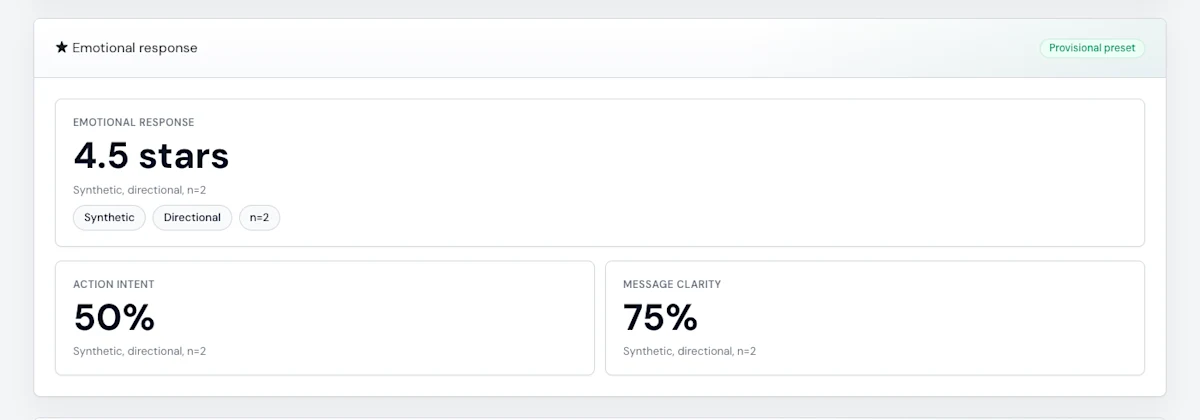
The report is the deliverable — a clean, structured read on how your media performed, designed to go straight onto a stakeholder's desk. At the top sits the emotional-response score — the single headline read on how the creative landed — alongside action intent and message clarity, each shown as a clear percentage with the audience's own quotes behind it. Below that: a demographic breakdown of who reacted, segment cuts showing where different groups diverged, the open-question responses, persona correlations, and recommended next steps. For films and longer content, the report adds an engagement map and a film-memory summary so you can see how attention moved across the runtime, not just an overall number.
6. Talk to your audience
Here's what makes Screening Room different from any test you've run before: when a reaction surprises you, you don't have to guess what's behind it. Click Chat on any response and open a conversation with that participant. Ask them to explain themselves, probe the why, push on the trade-off — exactly as you would in a live moderated session, except it's instant and you can do it with anyone in the room. The numbers tell you what happened; the chat tells you why.
7. Share it
When the report's ready, generate a read-only share link and send it to anyone — a stakeholder, a client, a creative partner — with no login required. They see the full report; they can't change anything. It's the simplest possible way to get the audience read in front of the people who need it.
What you get back, in detail
Emotional response — the headline read on how the creative made the audience feel.
Action intent — did it move people toward the action you care about (watch, buy, click, tune in)?
Message clarity — did the core message land, or get lost?
Brand fit, plus the audience's own verbatim reactions behind every metric.
Who reacted — a full demographic breakdown of the panel (profile, age/gender, location, income, occupation).
Segment cuts — how reactions differed across audience segments.
Open responses and synthesis, persona correlations, and recommended next steps.
For films and long-form content — an engagement map and a film-memory summary across the runtime.
Built for the way media teams work
Pre-testing ads. Test a commercial before the media buy. Compare two cuts and see which one carries the emotional response and the intent. Catch a clarity problem while there's still time to fix it.
Feedback on content and pilots. Get an early audience read on a pilot, a concept, or a piece of branded content. Find out what's landing and what's confusing before you invest in the next stage.
Screening films. Screen a full-length feature to a panel and get reactions plus an engagement map across the runtime — a fast, structured read on a film without standing up a recruited screening. Film screening is rolling out to pilot partners next.
Availability
Screening Room is rolling out to pilot partners now, starting with ad and content screening; film screening follows as we complete validation with our launch partners. If your organization has been enabled for Screening Room, you'll find it in your workspace alongside Research Studies. If you'd like access for your team, get in touch.
We built Screening Room because we believe every team should be able to ask an audience what they think — early, often, and without the wait.