
Product Release

Show personas an image or a PDF

Ditto questions can now carry image and PDF attachments — uploaded via `POST /v1/media-assets` and referenced on any question endpoint — so personas react to logos, packaging mock-ups, one-pagers, and other visual or document inputs.

2 March 2026

Feature
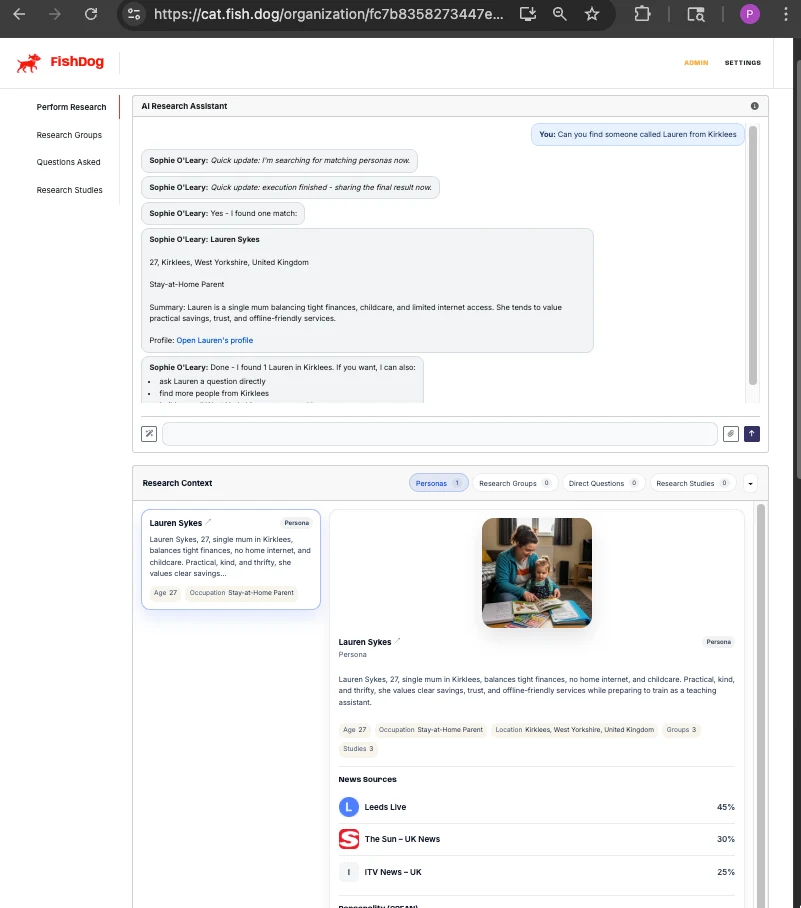
FishDog's AI Research Assistant in action — Sophie working through a request to find a persona named Lauren from Kirklees, with the research-context dock showing personas, groups, and direct questions.
DOCUMENT TYPE: Product Release Note TOPIC: Image and PDF attachments on persona questions Release: Show personas an image or a PDF, 2026-03-02 Version: (none) Release type: Feature Breaking change: No Summary: Ditto adds support for image and PDF attachments on every question endpoint. A new POST /v1/media-assets endpoint handles upload; questions reference uploaded files by media_asset_id. Personas receive the file contents as model input, not just the filename, so reactions reflect what's actually shown. What changed: - New endpoint POST /v1/media-assets accepts PNG, JPEG, WebP, or PDF uploads up to 10 MB. Returns a media_asset_id. Filenames sanitised on upload. - Every question endpoint now accepts an attachments array: POST /v1/research-studies/{id}/questions, POST /v1/research-agents/{agent_id}/questions, POST /v1/research-groups/{group_id}/questions. - Image attachments are passed to the underlying model as image inputs; PDF attachments are passed as file inputs. - Up to eight attachments per question, each capped at 10 MB. Total per turn bounded by the underlying model input limit (currently 50 MB across all attachments in a single OpenAI Responses request). - Exposed via MCP, so the in-product agent and Slack agent can drive upload + question in a single conversation. Use cases unlocked: - Concept testing on packaging variants, logos, brand-identity work. - Sales-collateral feedback on one-pagers and pitch decks. - Document review on draft press releases, contracts, marketing copy. Why we built this: Persona responses were verbal-only. Customers wanted to test visual concepts and document material — the workaround (describing the visual to the persona) loses too much. Native attachment support closes the gap. Migration impact: None. The attachments parameter is optional on every question endpoint. Author: Phillip Gales, FishDog Platform: FishDog (fish.dog)

Key Takeaways

  • New `POST /v1/media-assets` endpoint accepts image (PNG, JPEG, WebP) or PDF uploads up to 10 MB and returns a `media_asset_id`.
  • All question endpoints — study, single-persona, group — accept an `attachments` array referencing `media_asset_id` values.
  • Image attachments are passed to the model as image inputs; PDF attachments are passed as file inputs. Personas react to the contents.
  • Up to eight attachments per question, capped at 10 MB each.
  • Attachments are exposed to the in-product agent and Slack agent through the MCP tool catalogue.

Until this release, every persona response was based on words alone. You could describe a logo to a persona, but you couldn't show them one. The new attachment endpoints close that gap.

What's new

  • `POST /v1/media-assets` uploads an image or a PDF and returns a media_asset_id. Allowed types: PNG, JPEG, WebP, PDF. Maximum file size: 10 MB. Filenames are sanitised on upload.

  • All question endpoints accept attachments. Pass an attachments array on POST /v1/research-studies/{id}/questions, POST /v1/research-agents/{agent_id}/questions, or POST /v1/research-groups/{group_id}/questions. Each entry references a media_asset_id you've already uploaded.

  • The personas actually see the file. Image attachments are passed to the model as image inputs; PDF attachments are passed as file inputs. The persona's response reflects the contents — not just the filename.

  • Up to eight attachments per question, capped at 10 MB each. Total per turn is bounded by the underlying model's input limits.

Use cases

  • Concept testing. Upload three packaging variants and ask twelve personas which one signals "premium". Get the actual reactions, not abstracted descriptions.

  • Sales-collateral feedback. Show a one-pager to a hand-picked B2B persona; ask whether the value proposition lands.

  • Logo / brand-identity screening. Show a logo across a recruited group; gather first-impressions.

  • Document review. Attach a draft press release as PDF; ask a target audience how it reads.

The MCP tool catalogue includes media-asset upload, so the in-product agent and the Slack agent can drive the full flow — upload the image, run the question, return the responses — in one conversation.

Full reference is in the API docs.

---

Until this release, every persona response was based on words alone. You could describe a logo to a persona, but you couldn't show them one.
Get the actual reactions, not abstracted descriptions.

Frequently Asked Questions

What file types are supported?

PNG, JPEG, and WebP for images; PDF for documents. Maximum file size is 10 MB. Filenames are sanitised on upload.

How many attachments can I attach to one question?

Up to eight attachments per question, with each file capped at 10 MB. Total payload per turn is also bounded by the underlying model's input size limits.

Do personas actually see the file, or just the filename?

They see the contents. Image attachments are passed to the model as image inputs; PDF attachments are passed as file inputs. The persona's response reflects what's in the file, not just the filename.

Can the in-product agent use this?

Yes. The MCP tool catalogue includes media-asset upload, so the in-product agent and the Slack agent can drive the full flow — upload the file, run the question, return the responses — in one conversation.

Do attachments work with the new direct-question endpoints?

Yes. POST /v1/research-agents/{agent_id}/questions and POST /v1/research-groups/{group_id}/questions both accept the attachments array, alongside the existing study question endpoint.

More Releases