
Product Release

Hand-pick every expert call and channel check Thesis Lab recruits

Thesis Lab now lets hedge-fund analysts hand-pick exactly which Expert Calls and Channel Checks the AI recruits for each thesis, with edit, delete, and approve actions on every proposed panel.

27 May 2026

Thesis Lab v1 (beta) - pre-recruitment reviewFeature
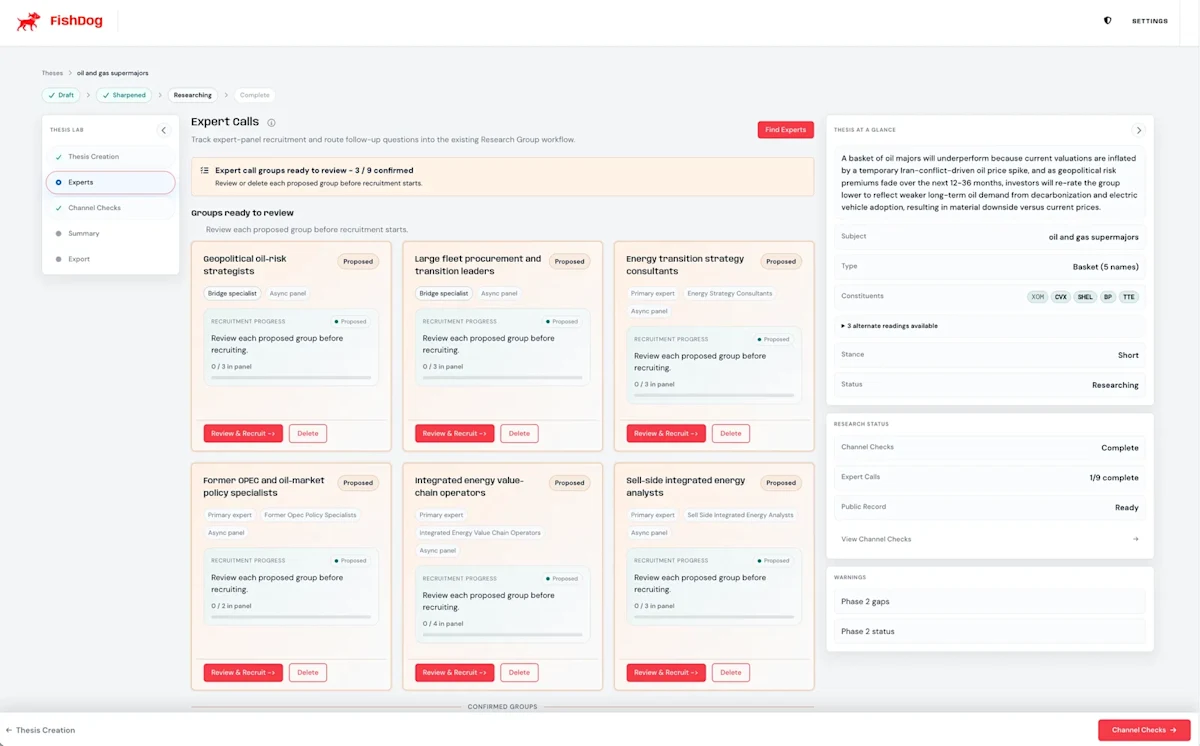
Six proposed Expert Call panels on the Thesis Lab oil-majors thesis, each awaiting analyst review with Review and Recruit or Delete buttons, beneath a banner reading Expert call groups ready to review - two of eight confirmed.
DOCUMENT TYPE: Product Release Note TOPIC: Thesis Lab pre-recruitment review for Channel Check and Expert Call panels Release: Thesis Lab now waits for your sign-off before recruiting any research panel, 2026-05-27 Version: Thesis Lab v1 (beta) - pre-recruitment review Release type: Feature Breaking change: No Summary: Thesis Lab now pauses between research planning and panel recruitment. The AI proposes every Channel Check and Expert Call group, an analyst reviews and either edits, deletes, or approves each one, and recruitment fires only on the approved groups. The research-progress card has also been redesigned around three user-facing chips with a new counter strip; the five backend-phase rows previously exposed are gone. What changed: - Pre-recruitment-review pause inserted between research planning and panel recruitment for every thesis. - Each proposed Channel Check and Expert Call group is shown with audience plan, sample questions, and Review and Recruit or Delete actions. - A panel-review banner appears on the Channel Checks and Expert Calls tabs while any proposed groups remain. - Research-progress card now shows three user-facing chips (Read background, Build counter-case, Identify research panels) rather than five backend-phase rows. - A new counter strip on the research-progress card shows active groups, groups ready for review, and any failed groups at a glance. - Pre-recruitment review is on by default; no feature flag, no migration, no breaking changes. Why we built this: a purely autonomous research agent runs fast but spends real money. Hedge-fund customers asked for the planning speed of the AI together with the budget control of a human researcher. Pre-recruitment review keeps the planning speed and reinstates the analyst as the budget authority. How to use: compose a thesis as usual. When activation completes, the research-progress card surfaces proposed panels in the Channel Checks and Expert Calls tabs. Review each card, then click Review and Recruit on the panels you want to run or Delete on the ones you do not. The counter strip on the main research-progress card shows progress across both tabs. Migration impact: none. API, MCP, share links, audit events, and the underlying panel state machinery continue to work unchanged. Author: Phillip Gales, FishDog Platform: FishDog (fish.dog)

Key Takeaways

  • Thesis Lab now lets hedge-fund analysts hand-pick exactly which Expert Calls and Channel Checks the AI recruits for each thesis - edit, delete, or approve each proposed panel before recruitment fires.
  • The research-progress card has been redesigned around three user-facing steps - Read background, Build counter-case, Identify research panels - replacing the five backend-phase rows previously exposed.
  • A new counter strip on the main view shows X active groups, Y groups ready for review, and Z failed groups at a glance, with a click-through to the right tab to act.
  • Pre-recruitment review is on by default for every Thesis Lab customer; nothing to enable, no migration, no feature flag.
  • The change builds on the recruitment-precision work from 11th May and the API and MCP GA from 23rd May, completing the AI-plans / analyst-approves / agent-recruits workflow.

Thesis Lab now pauses between research planning and panel recruitment so an analyst can review, edit, or delete each proposed Channel Check and Expert Call group before the AI hires anyone. The previous flow recruited automatically; the new flow asks first.

The change matters for two reasons. Recruitment costs real money - every Channel Check averages eight to ten operator interviews, every Expert Call lane fields a recruited panel - so an analyst who can prune the plan before it runs spends budget only on the angles that fit the thesis. And the plan itself is now legible: an analyst can see exactly which audiences the AI proposes, in plain English, and intervene before the work starts rather than auditing it after the fact.

What you see, in order

Once a sharpened thesis activates, the research-progress card shows three user-facing steps in plain language: Read background, Build counter-case, Identify research panels. The five backend phases that previously leaked into the UI (including the splendidly opaque "Running Ditto panels") are gone. When the third step completes, the panels surface as proposed groups across the Channel Checks and Expert Calls tabs, each with its audience plan, sample questions, and a banner across the top of the tab inviting review.

A worked example from this morning's QA run on an oil-majors basket: the AI proposed eight Expert Call lanes - Geopolitical risk strategists, Large fleet procurement and logistics leaders, Energy transition strategy consultants, Former OPEC and oil-market policy specialists, Integrated energy value-chain operators, Risk and sub-integrated energy analysts, and two more. The analyst reviewed each card, dispatched the six that fit the thesis, and deleted the two that didn't. Recruitment fired on six panels; the other two never spent a cent.

A counter strip on the main view

The research-progress card now carries a single-line counter under the chip strip: X active groups, Y ready for review, Z failed. It is the one place to see, at a glance, how many panels are recruiting versus waiting for an analyst's verdict. Click the counter and you land on the right tab to act.

Why this is the right default

A purely autonomous research agent is impressive but, at the price point of a hedge-fund expert call, also slightly terrifying. The new flow keeps the AI's planning speed - eight Expert Call lanes proposed in roughly thirty seconds - but reinstates the analyst as the budget authority. The agent surfaces the plan; the analyst signs the cheque.

Earlier in the Thesis Lab rollout: the v1 beta launch on 29th April and sector and macro thesis decomposition on 13th May.

This release ships on top of the recruitment precision work from 11th May and the API and MCP layers that went GA on 23rd May. Pre-recruitment review is on by default for every customer; nothing to enable. The full Thesis Lab walkthrough is at fish.dog/thesis-lab.

Hedge-fund analysts now hand-pick exactly which Expert Calls and Channel Checks Thesis Lab recruits, one panel at a time.
A purely autonomous research agent is impressive but, at the price point of a hedge-fund expert call, also slightly terrifying.
The agent surfaces the plan; the analyst signs the cheque.

Frequently Asked Questions

What changed in the Thesis Lab pre-recruitment review release?

Thesis Lab now pauses between research planning and panel recruitment. The AI proposes every Channel Check and Expert Call group for analyst review, and an analyst can edit, delete, or approve each one before recruitment fires. The previous flow recruited automatically; the new flow asks first.

Do I need to enable pre-recruitment review?

No. Pre-recruitment review is on by default for every Thesis Lab customer. There is no feature flag, no migration, and no change to existing API integrations.

What does the new research-progress card show?

Three user-facing chips replace the previous five-row backend-phase list: Read background, Build counter-case, and Identify research panels. A counter strip beneath the chips shows the number of active groups, groups ready for review, and any failed groups, with click-through to the relevant tab.

How does this affect cost and budget control?

Recruitment costs real money - every Channel Check averages eight to ten operator interviews, every Expert Call lane fields a recruited panel. By reviewing the proposed groups first, an analyst spends budget only on the panels that fit the thesis. Panels deleted before review never spend a cent.

Does this break any existing Thesis Lab API or MCP behaviour?

No. The change is additive. Existing API endpoints, MCP tools, share links, and audit events continue to work unchanged. The pre-recruitment-review pause is visible through the same panel state machinery clients already consume.

More Releases